Every tournament runs on its own private Wi-Fi network, and it comes ready to go in a rack bag. The fields, the screens and the referees' tablets all talk to Tournament Manager over it. Setting it up is mostly plugging in one power cord and flipping switches.
This is the first job for tech setup. Tournament Manager comes next, then the displays.
Why we bring our own network
The network is closed: it doesn't connect to the venue's internet at all. That's deliberate. Venue networks often block the traffic Tournament Manager needs, and a closed network takes that problem away.
The rack bag
There is one rack bag per tournament, labelled for that tournament. Inside is everything the network needs, already set up, plus the Tournament Manager laptop at the bottom of the rack.
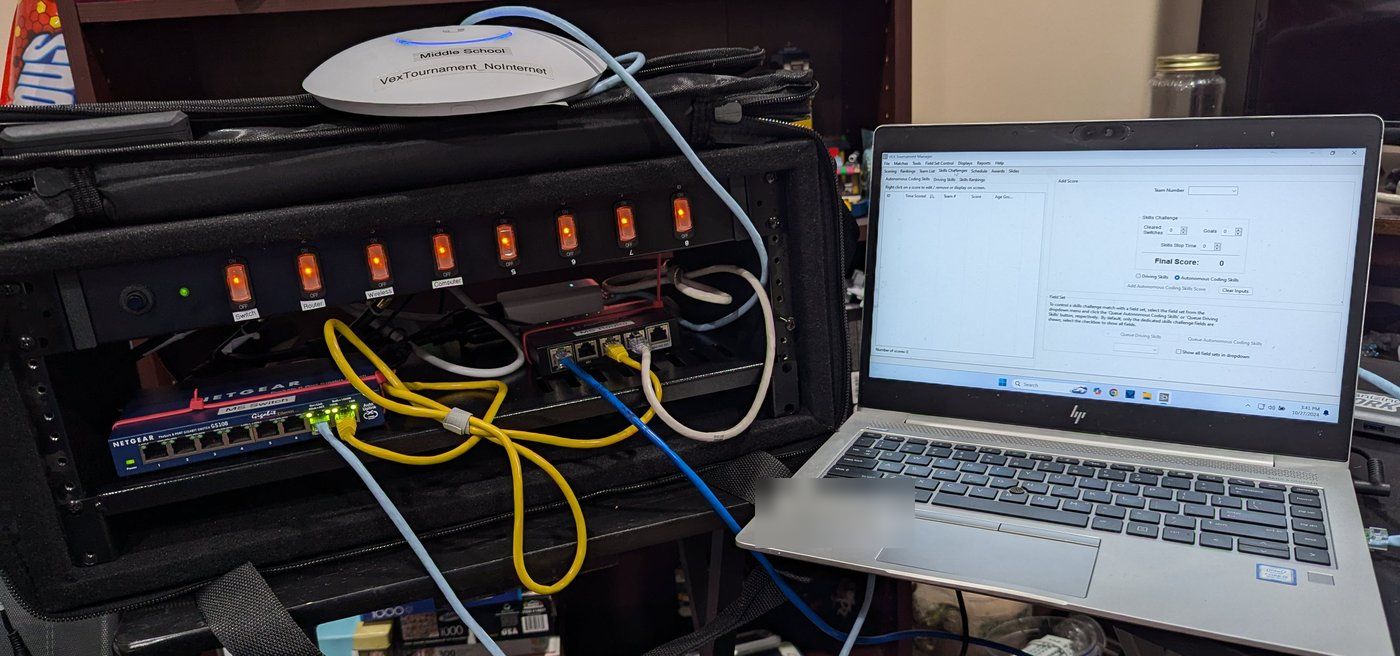
- The power strip has a switch for each part, labelled Switch, Router, Wireless and Computer.
- The network switch and the router sit in the rack.
- The Wi-Fi access point is labelled with its tournament and its network name.
- The Tournament Manager laptop travels at the bottom of the rack.
Everything is already cabled and configured. Don't unplug or move cables inside the rack.
How to set it up
- Ask the Event Partner where the tech table goes. It needs a dedicated table close to both competition fields.
- Set the rack bag on the table and open it.
- Plug the rack bag's power into an outlet. gainingSTEAM brings the power cords.
- Turn on the switches on the power strip: Switch, Router, Wireless and Computer.
- Give it a couple of minutes. The network takes a little while to come up.
Who joins the network
- The display Pis find the network on their own when they start up.
- The referees' tablets are already set up for their tournament's network.
The Wi-Fi password isn't published here. If someone needs it, send them to the Event Partner.
Two tournaments, two networks
When an elementary and a middle school tournament share a venue, each one has its own rack bag and its own network. Keep each tournament's equipment with its own rack bag.
Next: starting Tournament Manager.